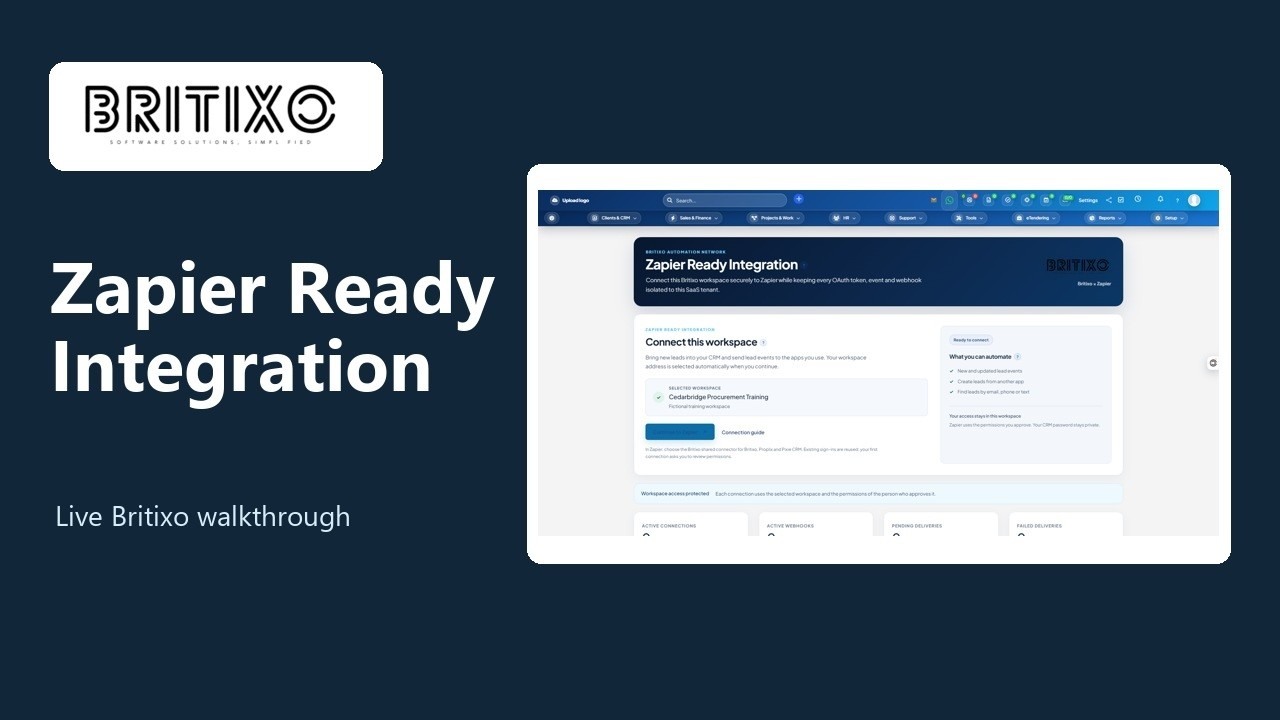
Find the Zapier integration screen
Find Britixo Zapier Ready Integration, connect the selected workspace and review connection, webhook and delivery controls.
Before you begin
Sign in to the CRM workspace with an administrator account that you are authorised to use. A billing or customer-portal login alone does not grant access to the staff administration screen.
CRM workspace → Tools → Zapier Ready Integration (or Utilities in a classic layout)
Follow these steps
- Open your Britixo account and launch the intended CRM company workspace using its normal access route.
- Confirm the company shown in the CRM.
- Open Tools → Zapier Ready Integration, or Utilities in a classic menu layout.
- Review the selected workspace and choose Continue to Zapier to start a connection without typing its address.
- Use Manage connections to review or disconnect connections. Failed deliveries lists individual Retry delivery controls for eligible failures.
Check the result
You can see the connector overview for the intended company and can distinguish a connection count from a webhook count or a queued delivery count.
Rules, fields and operating limits
- Only workspace administrators can open the connector overview.
- A zero count is normal before a connection and subscription have been created.
- An active webhook count alone does not prove that a Zap has completed successfully.
If something does not look right
If the menu is missing, ask an administrator to verify module availability and your access. Do not change another company’s settings or use a different workspace to work around a missing menu.
Questions and answers
Why is the screen not called Zapier Ready Integration?
The current screen is called Zapier Ready Integration. If an older label remains in your browser, refresh the CRM and check Tools or Utilities.
Why can my administrator see it but I cannot?
The current overview is restricted to administrators. API capabilities are separately checked against the authorising staff member’s lead permissions.
What is an active connection?
It is an OAuth connection whose refresh lifetime has not expired and which has not been revoked. Check the Zapier connection test as well; the number is a summary, not a live provider test.
What is an active webhook?
It is a registered event subscription. One connection can have more than one subscription, so the two counts need not match.
Where is the retry or disconnect button?
On Zapier Ready Integration, scroll to Manage connections for Disconnect connection, or Failed deliveries for Retry delivery. Review the affected Zap and destination before using either control.
Useful next steps
Contact Britixo support. Include the workspace, action, run reference and time; keep credentials private.